Step-1 Open Tableau Desktop
Step-2 Connect Data-source Example like – XYZ data source
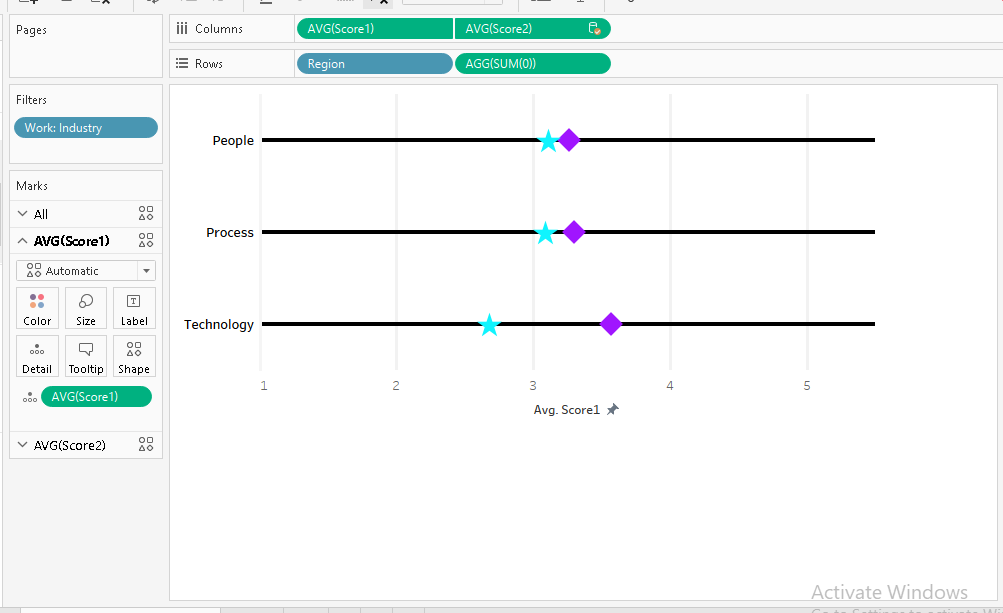
Step-3 1. Drag “Region” field dimension into Rows shelf
2. write SUM(0) in Rows shelf
Step-4 1. Drag “Score1” filed measure into Columns shelf
2. Drag “Score2“ filed measure into Columns shelf
3. RIght click on “Score2“ and select Dual axis
4. Right Click on Exis value and select Synchronize axis.
Step-5 Go to “Score1” Mark Shelf -> Shape -> Select shape as per your preference.
Step-6 Go to “Score2“ Mark Shelf -> Shape -> Select shape as per your preference.
Step-7 Right click on “SUM(0)“ -> select Formate -> go to Rows Tab -> Zeroline columns u can changes as per your preference.
Please look below image for reference
 Business intelligence